Audio to Word transcription: From a recording to a tidy DOCX
Author: Mert S. Kaplan · Last updated: November 5, 2026
Audio to Word transcription has two routes. With a Microsoft 365 subscription you can use Word’s own Transcribe. Otherwise you transcribe the audio in another tool and download a DOCX. Your subscription and how sensitive the recording is decide which is better, so here are both, step by step.
What Word’s own Dictate and Transcribe do
Word has two separate features that are often mixed up. One types as you speak, the other handles a saved file.
| Dictate | Transcribe | |
|---|---|---|
| What it does | Types what you say at the cursor | Transcribes a recording or uploaded file |
| Saved files | No | .wav, .mp4, .m4a, .mp3 |
| Speakers and times | No | Yes |
| What it needs | A Microsoft 365 subscription | A Microsoft 365 subscription, up to 300 upload minutes a month |
These details come from Microsoft’s help pages on Dictate and Transcribe (November 2026), which also list the languages.
To use Word for web Transcribe, open Word in Edge or Chrome, go to Home → Dictate → Transcribe → Upload audio and keep the pane open until it finishes. If you have the subscription and the recording fits the monthly limit, try this first.
Try it on your own recording
No card needed. 30 minutes of transcription on the free plan.
How to convert an MP3 to a Word document
If you have no subscription, want the sound to stay on your device, or want to correct the text as it is written, this is the way in LiveType:
- On New transcript, choose File as the source. To dictate instead, choose Microphone.
- Drop your MP3, WAV, M4A or phone recording, check the language and continue.
- Press Prepare the model, then Start transcription when it is ready.
- Fix names and terms as the text comes.
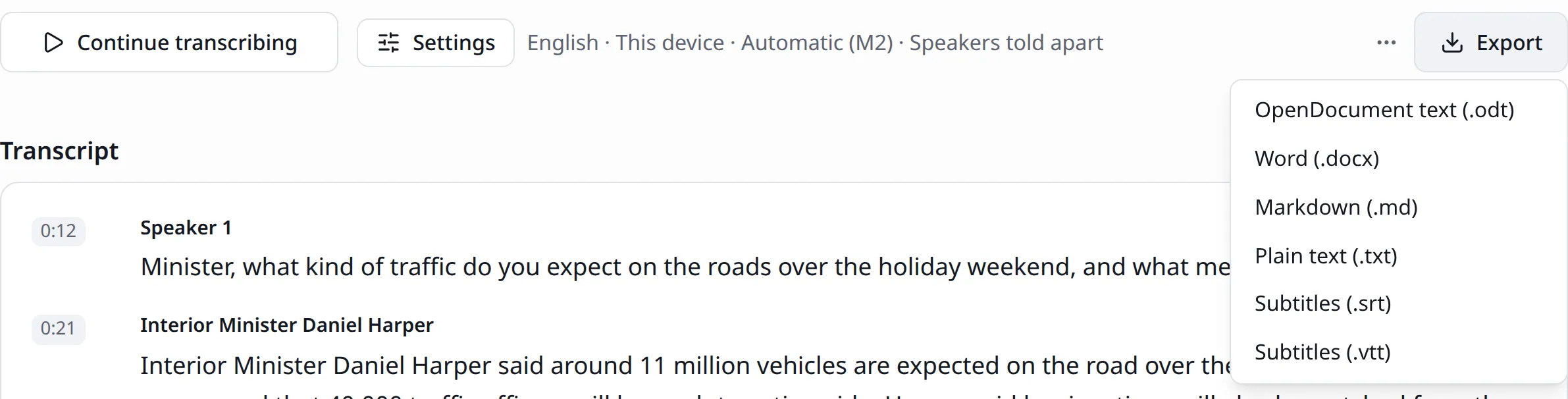
- In the Export menu choose Word (.docx).
The document is made in your browser and downloads straight away, named after the transcript:
What the document contains
| In the transcript | In the Word document |
|---|---|
| Paragraph | A separate paragraph |
| Speaker name | At the start of a paragraph when the speaker changes, in bold |
| Heading, bullet, numbered list | Word’s own heading and list styles |
| Bold, italic, link | Kept |
| Paragraph time | Left out; use SRT or VTT if you need times |
A meeting between two people comes out like this:
Anna Lee: The report will be done on Thursday.
Sam Ortiz: If the data arrives by Wednesday night, yes.
Change the “Speaker 1” label before you export: Write a name once and it changes in all of that person’s paragraphs. Speaker names in a transcript shows how.
Correct it in the transcript, not in Word
Fixing the text before it reaches a document is easier for two reasons. Clicking a paragraph’s time takes the recording there, so you can hear a doubtful sentence at once. And you can edit while it is still being written: Your changes do not disturb the words that follow. On a team, a colleague can work on the same text at the same moment. Once you are in Word, that link to the sound is gone.
Other formats: ODT, TXT or Markdown
| Format | When |
|---|---|
| Word (.docx) | A document to open in Word or Google Docs, with its formatting |
| OpenDocument (.odt) | LibreOffice, and an open format common in public bodies |
| Markdown (.md) | Note apps and web writing |
| Plain text (.txt) | Unformatted text, analysis programs, email |
All of them include speaker names. See exporting and sharing for the details.
Choosing an MP3 to Word converter
Word’s route stays inside Word and gives speakers and times in the same pane, but it needs a subscription and the file goes to Microsoft’s service. With on-device transcription in LiveType the sound does not leave your device (private transcription), but it does not run inside Word and has no add-in: You download the document and open it. If you have a company template, you bring the text into it yourself.
To prepare the recording, read how to transcribe a recording. File types are on the MP3 to text page. To compare tools, see Voiser. The free plan includes 30 minutes in total.

Works in news, software and design; founder of LiveType. Worked as a reporter for many years. Has done SEO consulting, content editing and reporting for several online news sites, and has developed many pieces of software. Currently works in the press office of the Turkish Medical Association and provides SEO support to Elips Haber.
Related pages
Try it on your own recording
No card needed. 30 minutes of transcription on the free plan.