AI transcription accuracy: How it works and where it goes wrong
Author: Mert S. Kaplan · Last updated: November 5, 2026
AI transcription accuracy depends on one thing above all: A model does not look words up, it predicts which words the sound most likely is. That prediction explains both why it works so well and how it fails. Here is how the system works and where you should not trust it.
What Whisper is
Whisper is a general-purpose speech recognition model that OpenAI released in 2022. Its code and model weights are open under the MIT licence, so other software can use it. It comes in sizes from tiny to large: Small models are fast and large ones write more accurately.
LiveType runs Whisper in your browser or, if you choose, sends the sound to a cloud provider. Our measurements of OpenAI Whisper accuracy by model are in Whisper accuracy by language. Video to text AI follows the same path after separating the video’s sound: See the video to text converter.
Try it on your own recording
No card needed. 30 minutes of transcription on the free plan.
How speech becomes text
- Speech is picked out. A separate small model finds where in the sound people are talking. Silence and music are left out as far as possible.
- Sound becomes a picture. The waveform turns into a table of which frequencies dominate at each moment.
- The model predicts words. Whisper reads the sound in windows of up to 30 seconds and writes the text piece by piece, using the context.
- The result is cleaned. Our software removes repeats, stock phrases invented in silence and hesitation sounds.
No stage “knows” the meaning. The model picks the most likely continuation given the huge amount of sound and text it was trained on.
Where it goes wrong
| Error | Why | What to do |
|---|---|---|
| Names | An unknown name becomes the nearest word | Confirm people and places at the source |
| Numbers | “Fifteen” and “fifty” sound close | Check every figure by ear |
| Negation | A lost “not” reverses the meaning | Listen where it matters |
| Overlap | One line comes out and someone is lost | Fill in from the audio |
| Loops | One sentence repeats | The engine removes most; delete the rest |
| Invented sentence | In silence or noise the model still writes | Listen to anything off topic |
The last is the most dangerous, because the result is a tidy, believable sentence. The peer-reviewed Careless Whisper study documented this in English recordings. We cover what it means for newsrooms in AI transcription ethics.
Invented sentences in silence
Whisper was trained on pairs of sound and text gathered from the internet, and a large share of them appear to be subtitles. That seems to be why, on silence, music or applause, it tends to write what appears at the end of subtitles. While building our engine we saw these most often:
- “Thanks for watching.”
- “Please subscribe.”
- “Subtitles by the Amara.org community”
- “[Music]”, “(applause)” and similar sound notes
LiveType filters these, does not send trailing silence to the model and does not re-run unchanged sound. That clears the common patterns, but it cannot catch every invention: We cannot know a new one in advance.
Realtime Whisper latency: Why live text lags
A model cannot safely write a word before hearing what follows. So a faint guess appears first, and it turns solid once later passes confirm the same words:
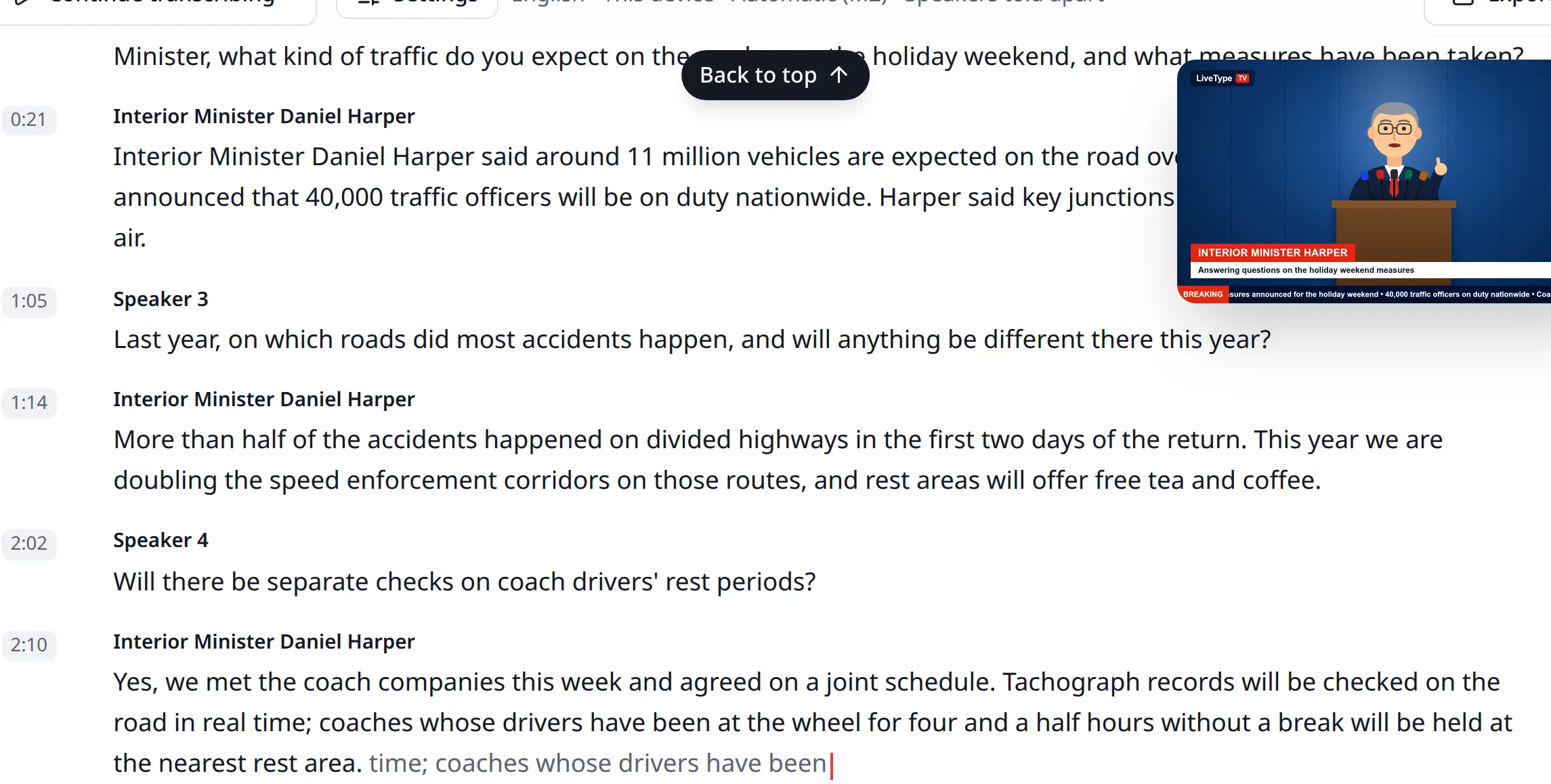
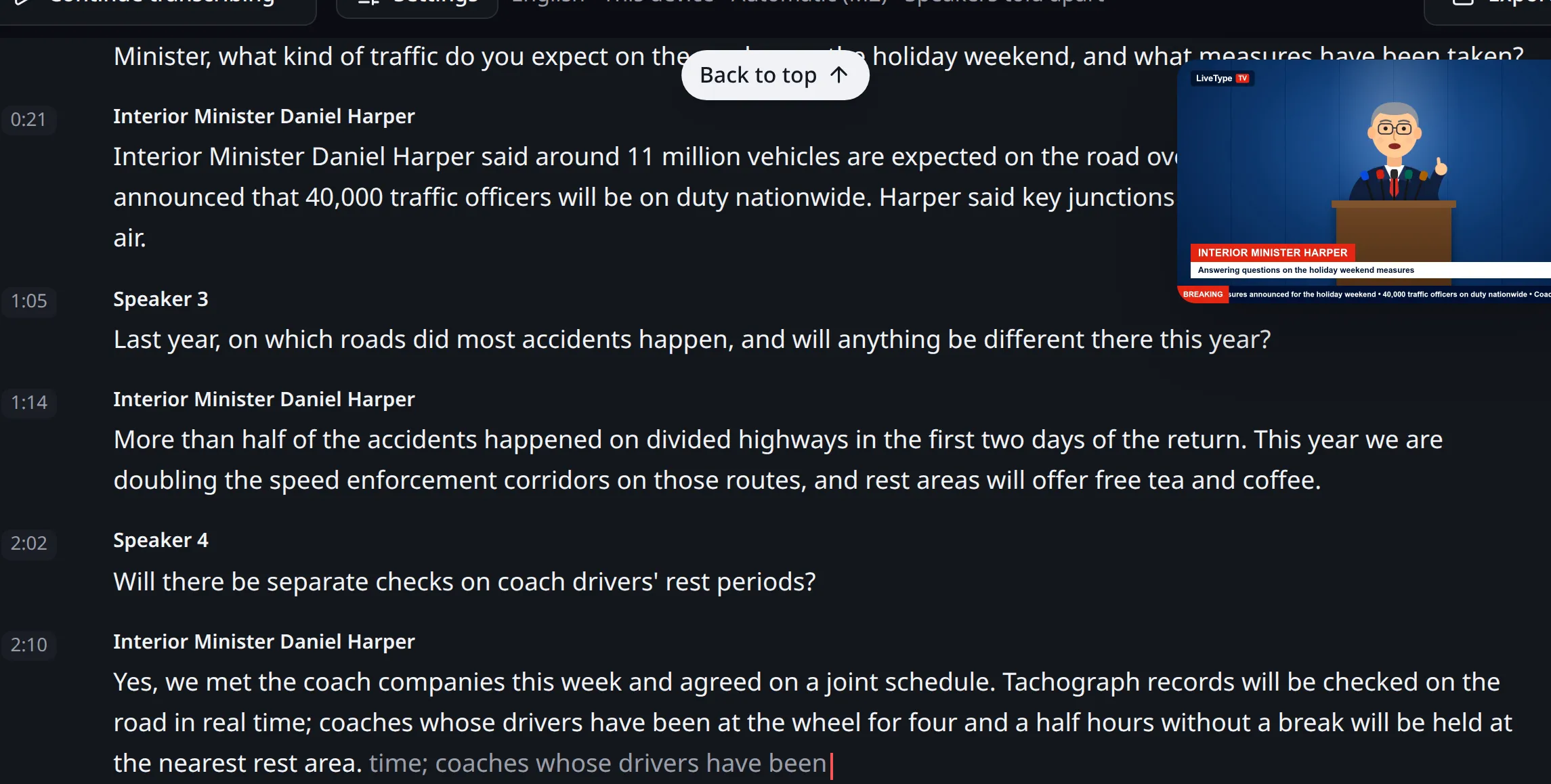
Three things set the lag: Model size, your graphics card and how the speech flows. The page shows the lag as it happens, suggests a smaller model if your device falls behind and a more accurate one if it has room to spare. You can edit solid text straight away. If you will quote something, wait until it is final.
Speaker diarization: What it means and how it works
Speaker diarization means working out who spoke when. Whisper does not do it: It only writes text. So speaker diarization with Whisper always needs other models:
- Splitting: While people talk, one model looks at the last few seconds and finds how many different people are speaking.
- Recognising: A second model makes a voice print of each speaker. Prints are compared, and the same print gets the same number.
It is deliberately cautious. Two people merged under one number cannot be fixed later, while one person split into two is solved by giving both one name. So you may see more numbers than people. Voice prints may count as biometric data, so they never go to the server and stay encrypted on your device. See speaker names.
Why piece length matters in the cloud
In the cloud, sound goes in pieces cut at silences, so no word is split. That is why there is no faint text there: The text arrives as each piece finishes.
Piece length affects the result for some languages. In our own tries on Groq, Turkish text fell apart in pieces of two minutes and longer, so files go in one-minute pieces. That is our own trial, not a research measurement. Cloud transcription and remote devices compares the options.
How to improve Whisper accuracy
- Record cleanly. Moving the microphone closer helps more than any setting.
- Choose the right language. The wrong one ruins the text.
- Use the largest model your device can carry. Choosing a model helps.
- Fix names early. You cannot give a list of names in advance: Whisper copies the style of any text it is given, so we closed that route. You correct them in the text.
When a human must check
If text will be attributed to a person, carries legal weight, will be published or becomes research data, a person must check it. A machine’s text is a draft, and whoever uses it is responsible for it. Do not treat a quote as verified until you have heard it. For a step-by-step check, use the list in how to transcribe a recording.

Works in news, software and design; founder of LiveType. Worked as a reporter for many years. Has done SEO consulting, content editing and reporting for several online news sites, and has developed many pieces of software. Currently works in the press office of the Turkish Medical Association and provides SEO support to Elips Haber.
Related pages
Try it on your own recording
No card needed. 30 minutes of transcription on the free plan.